


From commercial branding to home decor – humans are attracted to colors, how they work together, and how they convey emotions.
In this Chart, we take you through the basics of the color wheel and the fundamentals of color mixing. For now, we stick to the RYB model mostly used by artists and designers who work with physical colors, say, paints, pigments, or dyes.
With this handy color mixing guide, you can create your own range of custom colors in no time!
Download our Color Wheel Chart Series to learn more about the fascinating world of color!
Primary, Secondary, and Tertiary Colors
Here, we identify the three types of colors in an RYB wheel: primary, secondary, and tertiary.
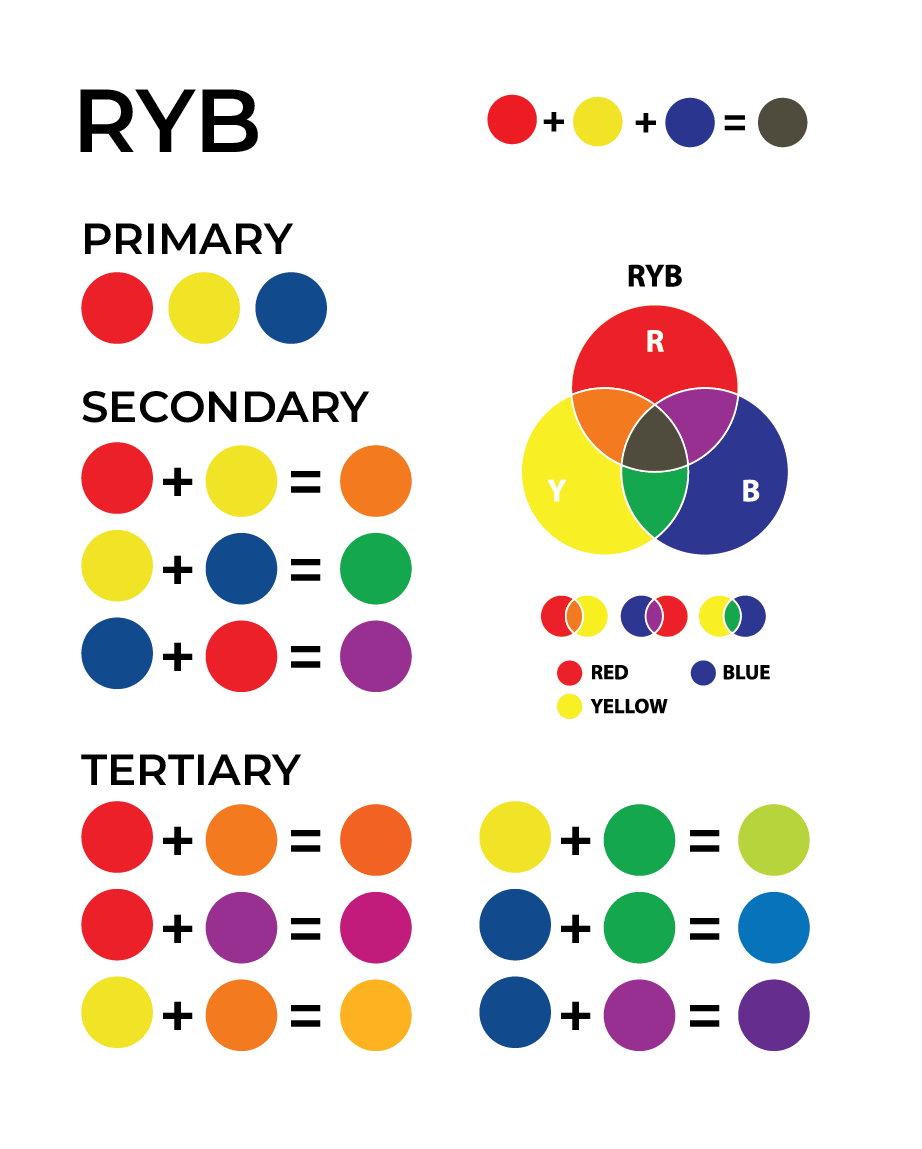
Our primary colors are Red, Yellow, and Blue. Mix them together, and the color possibilities are endless.
Remember, the RYB color model is subtractive, which means colors get darker as you blend them. This is also true of CMYK ink colors used by printers.
Moving on, we have secondary colors.
You create a secondary color by mixing equal parts of two primary colors. Mix red and blue to get violet, red and yellow to get orange, and blue and yellow to get green.
Next up are the tertiary colors, created by mixing a primary and secondary color to get 6 distinct hues:
- Red-orange: A mix of red and orange
- Yellow-orange: A mix of yellow and orange
- Yellow-green: A mix of yellow and green
- Blue-green: A mix of blue and green
- Blue-violet: A mix of blue and violet
- Red-violet: A mix of red and violet
As you can see in our Chart, the miracle of the color wheel is you only need 3 Primary Colors to mix the full range of all 12 colors depicted!
Warm and Cool

The wheel in this Chart is organized around color temperature, with warm colors like red and purple shown on the right and a cooler range of colors from orange to green on the left.
Understanding how color temperature works is important for photographers and filmmakers who use it to balance light and color. The right temperature balance helps you create the right kind of color harmony or contrast in your work.
Use our color mixing wheel to create warm and cool shades of all primary colors. Let’s say, a warm blue or a cool red.
Color Mixing Grid
At the heart of our chart, is a 13-by-13 mixing grid to help you visualize what happens when you mix any two colors.

A neatly designed column and row-based layout allows you to very easily reference any two colors to see their combined result.
For example, to find the blend of Red and Violet, locate Red in the row and Violet in the column. The cell where the two lines meet shows the resulting color blend. As an artist or designer who wants a quick preview of what two colors look like when they are mixed, this grid is useful as it allows for efficient and precise color reference.
Proportional Color Mixer
This part of our Chart is based on the idea of proportional color mixing.

Proportional mixing involves using simple ratios of colors. For instance, when we add two parts of red to one part blue, we have magenta.
This allows users to blend two or more colors in different quantities and see the resulting color. It also shows how changing ratios can influence the final color, offering flexibility in color strength and depth.
Use our grid to see what happens when you mix two of your favorite colors, and the results might surprise you!
Pin our color mixing chart to your Pinterest for easy future reference!
Grayscale
Grayscale is a color tool that uses only one component to define color – lightness. Each pixel of three primary colors shown is made up of shades of gray, black, and white.

Knowing how to use a grayscale allows you to work with a single hue while playing around only with the light and dark of the color.

In practical terms, it’s a good way to create a sense of depth in your composition. This is because adding light over the object creates a sense of the 3-dimensional.
Tertiary and Color Mixing
If you are interested in slightly more complex color mixes that go beyond the use of primary colors, this section of our Chart shows what happens when you keep on blending colors to achieve more nuanced and neutral shades.
While a tertiary color is created by mixing a primary and secondary color, quaternary colors are created when you mix two tertiary colors evenly.

You can think of quaternary colors as much neutral versions of green, purple, and orange, also called olive, prune, and buff.
After Quaternary, there are quinary, senary, septenary, octonary, nonary, and denary colors. To avoid cluttering, these have not been represented in this Chart.
Why Is this Chart Useful?
Our Chart offers a detailed yet user-friendly guide for RYB color mixing. If you are new to painting, this guide comes in handy as it allows you to create just about any shade you can think of by mixing instead of buying a huge variety of individually bottled paints.
Once you know these art color basics, you can experiment with colors more confidently, achieving the exact hues, shades, and tones you desire.
But remember, getting used to color mixing takes time and experimenting so keep trying different blends to get the results you want. To help you learn, our Chart comes with a blank template you can use to practice your color-mixing skills.
Our professionally designed Color Mixing Wheel Chart for Artists and Designers is downloadable in PDF and ADOBE formats.
Be aware that the colors shown in these charts may vary significantly based on the medium used (e.g., watercolor, acrylic, digital) and the color model (e.g., CMYK, RGB, HSL).
In addition, display settings (such as night mode and resolution) can also affect color appearance. To avoid errors, always test colors in your specific context for more accurate results.


