Your business success thrives on accurate and proper documentation practices. Maintaining a proper record of calls can make a difference between opportunity and success. Therefore, it is essential that you maintain a proper system of recording all your calls.
At WordLayouts, we have designed several templates for various businesses to create a call log sheet. These templates are easy to use and have been designed to store information not only about the calls but also about the caller, queries, potential sales leads, duration and time of call, purpose of call, etc., to provide a comprehensive picture, reports, and call log records. These templates can be accessed in multiple formats, like Excel, Google Sheets, ODT, and Excel Template. They are good for startups or businesses on budgets and have everything Excel has to offer for call logs. Anything more will require dedicated software or apps.
Simple Call Log Template

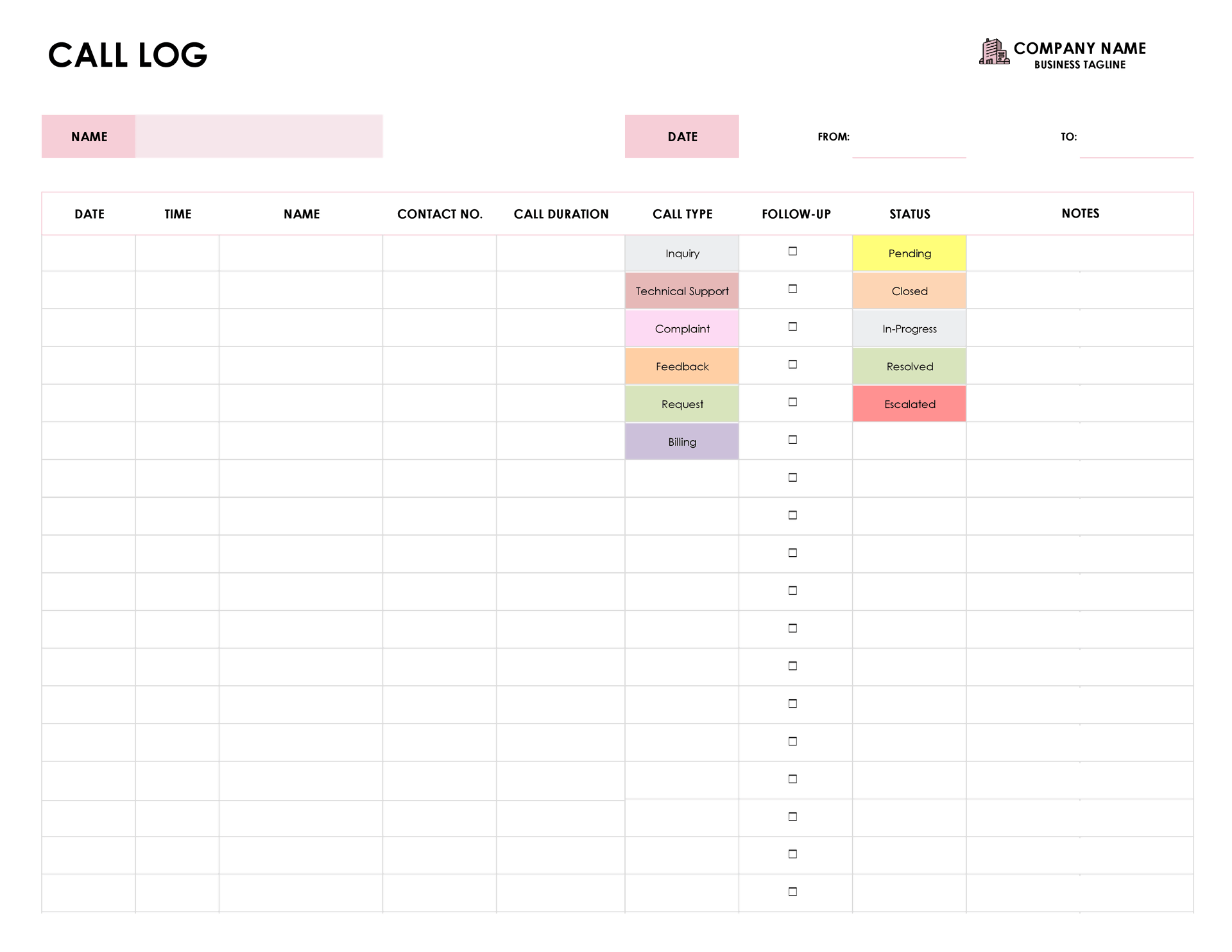
This call log template is designed to document various types of calls and can be used in multiple settings. It is suitable for customer service representatives, support staff at various types of organizations, and salespersons. The template consists of two sheets: the first is the main call log, and the second one is a configuration sheet. The main sheet of the template is for recording details of the call. You can add the date, time, contact name, number, call duration, call type, follow-up requirements, status, and additional notes in the designated columns.
The configuration sheet has been designed to help you quickly enter data by providing drop-down menus for various fields of the main sheet. You can customize the Call Type and Status fields, which have their own unique color codes. By default, we have added various options for the call type: Inquiry, Complaint, Request, Feedback, Technical, Support, Billing, Account Management, and Emergency.
Similarly, options are also provided for the status fields like, Closed, Resolved, Pending, In-Progress, and Escalated. While we have provided these options in these tables, you can easily add or modify the existing ones according to your own preferences. This simple call log is versatile and can be modified according to business requirements.
Customer Service Call Log Template

This call log template is designed for customer service departments. It has a thorough design and is a good solution for managing interactions with customers.
This template comprises two sheets: a main sheet for recording call details and a configuration sheet for modification of drop-down menus in the main sheet. You can record the date and time of each call, along with the customer’s name and contact information, in the main sheet. Moreover, you can summarize what the call was about. The information you enter can be used to build a customer database, which helps you manage customer relationships better. This flexible template makes it easy to tailor to your needs and improves both your call tracking and customer management.
Daily Call Log Template

This daily call log template is designed to comprehensively document call interactions during a business day. It comprises two sheets: one main sheet and one configuration sheet.
At the top of the template, fields for agent details, call date, and department are provided for easy identification. You can record client information such as a unique ID, name, company, phone number, call time, and duration in the designated fields. Dropdown menus for call answered (Y/N), lead status, and action items (e.g., “Follow Up” or “Send Email”) are provided, which are fully customizable via the configuration sheet. This template offers a flexible and comprehensive solution for managing call records with simplified data entry.
Sales Call Log Template


This Sales Call Log Template is specifically designed for sales departments. It has two sheets: a main sheet for recording call details and a client information sheet. The main sheet includes fields for essential details like Associate Name, Company Name, Email, and Phone Number. Alongside these, columns for Date, Time, Call Duration, and Call Type are also provided. The client information sheet is linked to the main log and any changes made here are automatically reflected in the main sheet.
The client information sheet helps you store detailed client data such as their employer, address, and contact information. Additionally, the template includes a sales call checklist with sections like Prior to Call, First-Time Calling, Sales Information, and Follow-Up Information. This template not only automates data entry but also supports accurate record-keeping and helps you maximize your efficiency in all stages of the sale process.
Patient Call Log Template


This Patient Call Log is a specialized call log template designed for healthcare facilities. It is useful in managing healthcare provider and patient communication.
The template has three interconnected sheets: a main sheet for recording the details of the call and a Patient Information Sheet with fields for Patient ID, Name, Date of Birth, Age, Gender, Contact Number, and Medical History. Lastly, a configuration sheet is provided to modify various dropdown menu options in the main sheet. By automating the data entry, this template helps minimize errors and save time.
Overall, this template simplifies recording and managing patient calls and improves your productivity while managing calls at a healthcare facility.
Client Call Log Template


The client call log is designed to effectively manage client interactions and improve lead generation. It consists of two sheets: a main sheet for recording basic details about the phone call and a client information sheet, which maintains a detailed database of client details. The main sheet includes fields for recording the date, time of call, client’s name, contact number, number of calls made, last call date, day difference, priority, lead status, and call notes.
The client information sheet, on the other hand, has fields to record name, client type, client source, email, contact number, and address. The configuration sheet supports the dropdown menus in the main sheet. The standout feature of this template is the graphs at the top of the sheet, which are derived from the data points in the main sheet. The graph is for visually summarizing priority, status, and client source. This template is designed for versatile industries and can help you maintain effective communication with your clients.
Sales Lead Tracking Log Template


This template is designed for managing sales lead calls in various industries. It consists of five interconnected sheets. The main sheet is for tracking calls but also records the outcomes, status, and action items. The client information sheet maintains a record of all clients. The product information sheet is provided for maintaining a list of products by the company and features relevant fields like product ID, name, details, and price, which can be referenced during the call.
The tracking list is useful for filtering calls and their status based on specific dates and helps to monitor progress. The configuration sheet is a special feature of this template, as it supports all drop-down menus in the rest of the template. You can modify, add, or remove options for the dropdown selection according to the requirements of your business. This is a comprehensive template that is useful for monitoring the progress of the sales teams and efficiently managing lead communication at all stages of the sales pipeline.
Receptionist Call Log Template


This template is designed for professionals who manage a reception at any business. It provides a structured worksheet to record call interactions and also features graphs for a visual overview. The main sheet in this template is for logging caller details. It also features caller information and an employee information sheet. The caller information sheet helps you create a database of callers and contains fields like the caller’s name, company, etc.
The employee information sheet is a database of the employees who will be forwarded the calls by the receptionist. The template includes dynamic graphs that give a visual overview of all the different aspects of the calls the business received. This template will help you track all incoming and outgoing phone calls in any organization and ensure that messages reach the appropriate person. It is particularly useful in busy offices where keeping track of communications is necessary for operational efficiency.
Maintaining Data Privacy and Security with Call Logs
When you are collecting such diverse and detailed data about your clients through a call log, you must also be careful about how you will handle and safeguard this sensitive information. It is important that you take measures to protect this information to build trust and maintain the confidentiality of your clients.
But more so, it is also important to be careful about the personal information of clients to comply with various privacy regulations and maintain your credibility as a reliable business. You must make sure that only authorized personnel can access such records, which would help you ensure that no data breach takes place and maintain the integrity of your company.
Best Practices for Safeguarding Call Log Data
- You should make sure that only those employees who actually need to use the information for their work access the information. You can do this by implementing access controls that allow only relevant people to gain access.
- Encryption can be useful to safeguard information both in transit and at rest. Make sure that you use a strong encryption standard to block any unauthorized access.
- Maintaining audit trails for accessing call logs is also a good business practice. Maintain clear records of who and when someone accesses the call data. It is also important that you regularly review these trails to check for any suspicious activity.
- Be clear about your data retention policy. Try to delete any data that you no longer need and try to collect only the information which is really relevant to your work.
- As an employer, it is your responsibility to train employees about data privacy and security best practices. Also, conduct regular refresher courses and stay up to date with the latest regulations as well.
- To handle data breaches, create an incident response plan. This will help you improve your handling of sensitive information. It is also important to test such a plan regularly and make any changes that might be needed.
An accurately designed call log template can help you simplify your call management system and enhance your productivity. These templates have been designed according to industry standards and ensure easy call record maintenance.